
Let Revit handle the boring bits
Turn the engineer's member schedule into Revit steel and concrete types, keep Excel and the model in sync, and issue drawing transmittals in one click.
Download Free See the workflowAvailable Now
Free to download and use on any project. Each card shows the same icon you'll find on the Bluestone tab in Revit.

Steel Types
Create beam and column types from Mark and Size, such as FB1-310UB40.4. Missing AS sections load from the Revit library automatically. Run it again after a revision to swap changed sizes.

Concrete Types
Create concrete column and beam types with their dimensions. Map your columns once and the mapping is remembered.

Sync Parameters
Write remarks and other Excel columns to placed steel members, with a preview of old and new values.

Export Schedule
Write placed steel members to the Member Schedule tab, ready for the engineer to edit and load back.

Export Concrete
Write concrete types to the Concrete Schedule tab, in the same layout Concrete Types reads.

Drawing Transmittal
Every sheet in the sheet list with its full revision history, as a formatted Excel transmittal dated in the file name.
One Excel file per project
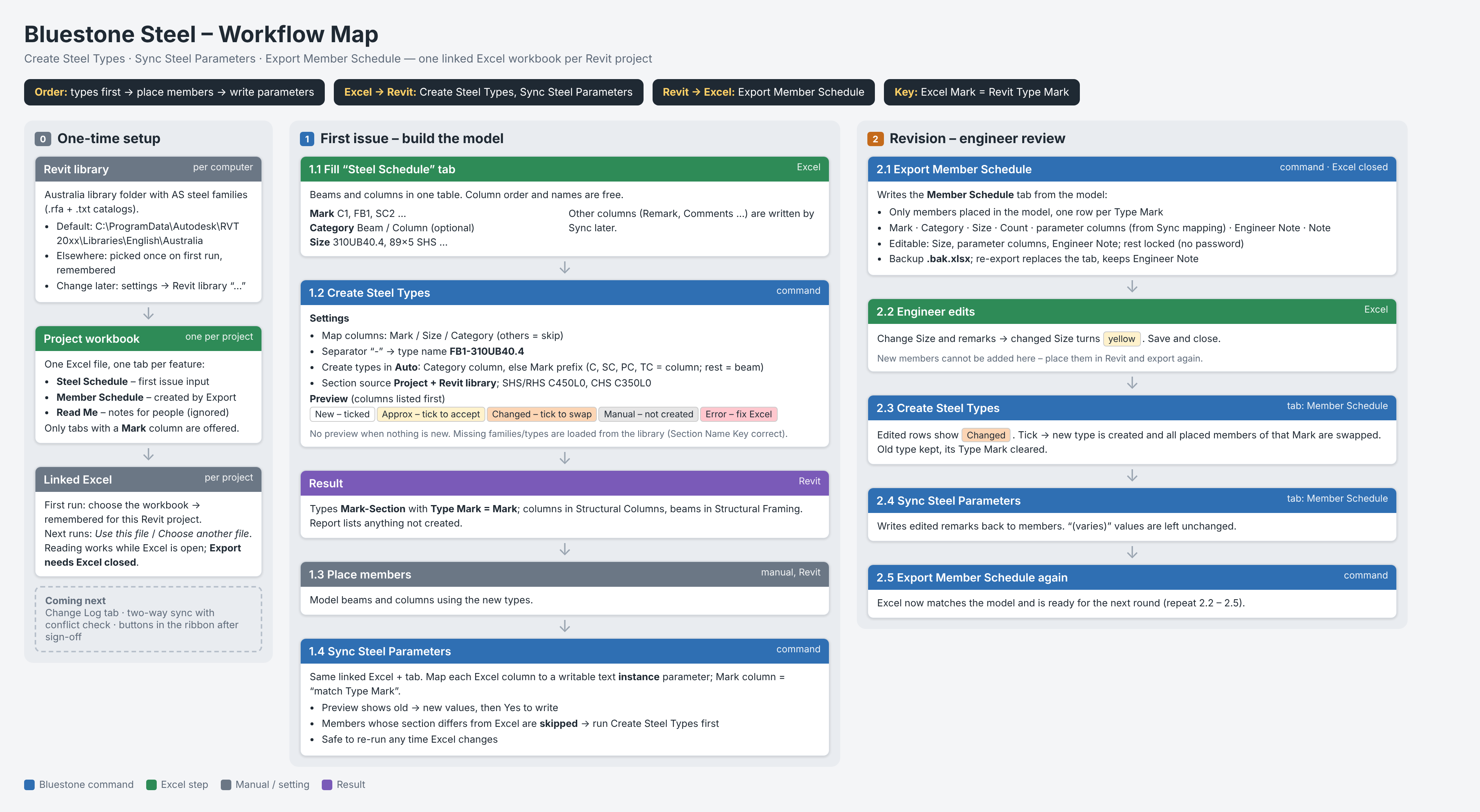
The steel tools share one linked workbook, so the schedule and the model never drift apart.
- Fill the Steel Schedule tab with Mark and Size.
- Steel Types creates every type, with a preview first.
- Place members in Revit as usual.
- Sync Parameters writes the remarks.
- Export Schedule hands the engineer a Member Schedule to mark up, then you load the changes back.
Coming Soon
Tell us which one you want first.
Two-Way Sync with Change Log
Every Excel change logged and checked for conflicts before it reaches the model.
Structure Generators
Fill in a few standard inputs and build a whole structure, starting with portal frames.
One-Click Drawing Setup
Sheets, sections and views set up with a button or two.
Tag Clash Finder
Spot tags and annotations that overlap on your sheets before issue.
Drawing Checker
Catch missing tags, unplaced views and other issues before drawings go out.
Pricing
Everything available today is free, and stays free.
Bluestone Free
FREE- All six tools above
- Revit 2025–2027
Bluestone Pro
COMING SOON- Everything in Free
- New Pro tools as they're released
Enjoying Bluestone Free? If it saved you an afternoon, you can chip in to help fund the next tools.
Support BluestoneAbout
Bluestone started from years of structural Revit work and too many hours spent on the same tedious steps. Every tool fixes one real, repetitive job, and nothing more.
Got a boring task you'd like gone?
Email info@bluestonebim.com. Your feedback shapes what we build next.